














Netdata ships with 1,100+ stock alerts. They cover a wide range of infrastructure conditions and they’re designed with sensible defaults. But “sensible defaults” and “correct for your environment” are not the same thing. A CPU threshold that’s perfectly reasonable for a build server might generate constant noise on a machine running batch jobs. An alert that’s critical for production might be irrelevant in staging, where it fires daily and everyone ignores it.
Over time, this mismatch compounds. Teams develop alert fatigue. They start ignoring alerts, silencing them indefinitely, or turning off notifications for entire categories. The problem isn’t that the alerts are bad. It’s that they haven’t been tuned for the specific environment they’re running in, and until now, there was no easy way to see which ones needed attention.
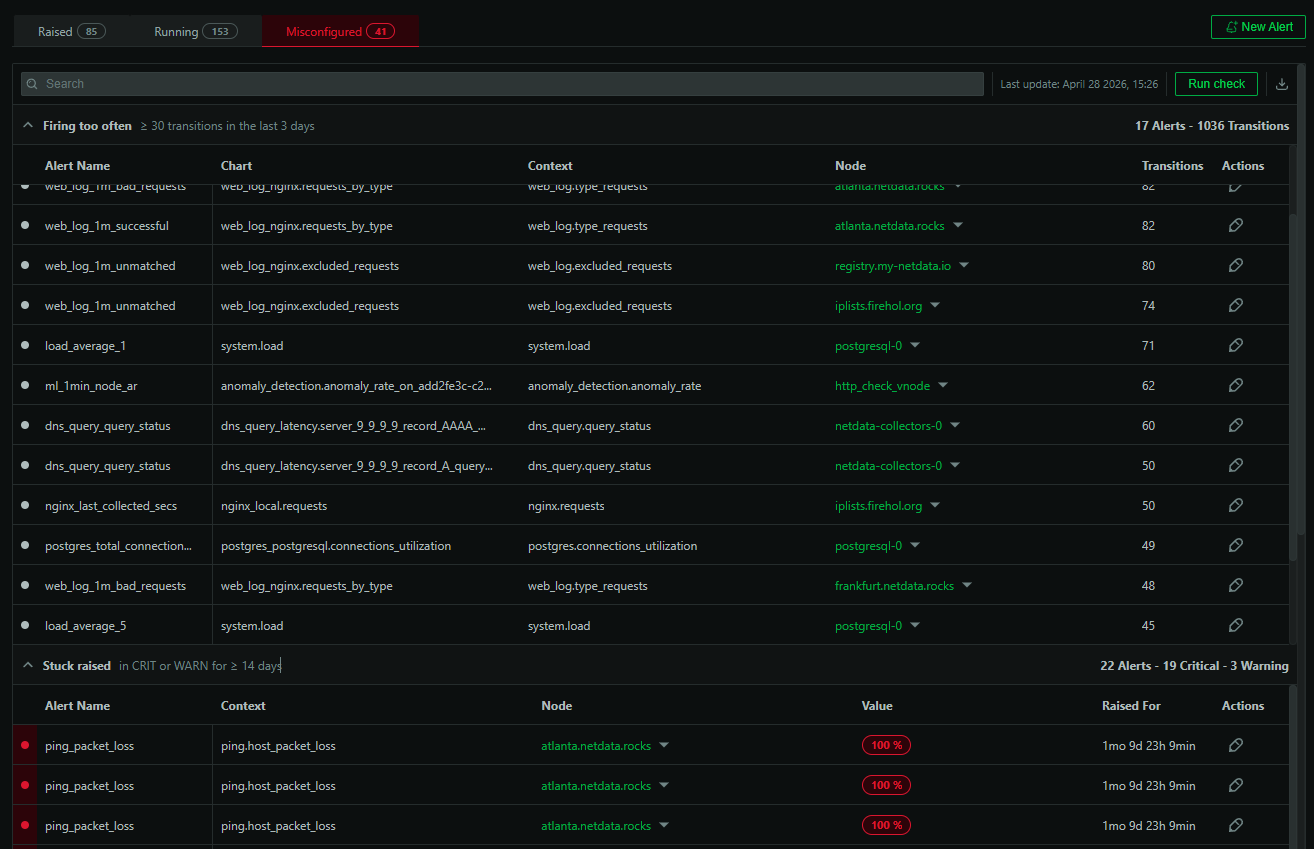
Netdata now identifies misconfigured alerts automatically and tells you about them.
What gets flagged
The detection is rule-based and straightforward. Netdata looks at alert behavior over the past 30 days and flags alerts that fall into four categories:
Firing too often. Alerts with 30 or more state transitions in the last 3 days. An alert that’s constantly flipping between OK and WARNING (or WARNING and CRITICAL) is almost certainly too sensitive for your workload. It’s generating noise without providing actionable signal.
Stuck in a raised state. Alerts that have been in WARNING or CRITICAL for 14 or more consecutive days. If an alert has been raised for two weeks and nobody has acted on it, it’s either a known issue that should be handled differently or a threshold that doesn’t match your operational reality.
Silenced too long. Alerts with 20 or more transitions in the last 30 days that have been silenced. These are alerts that are clearly active but have been muted rather than fixed. Silencing is a useful short-term tool, but long-term silencing usually means the alert definition needs adjustment.
Not dispatched. Alerts that have fired 10 or more times in the last 30 days with notifications turned off. Similar to silenced alerts, these represent monitoring blind spots where the alert is doing its job but nobody is hearing about it.
Why this matters
The alerts that cause the most damage aren’t the ones that are obviously broken. They’re the ones that slowly erode trust in the alerting system. When an engineer gets paged for the same non-actionable alert three nights in a row, the rational response is to start ignoring alerts. That’s how real incidents get missed.
Identifying these alerts explicitly makes the tuning process concrete. Instead of a vague sense that “our alerts are noisy,” you get a specific list: these 12 alerts are firing too often, these 4 have been raised for weeks, these 3 aren’t reaching anyone. That’s a list you can work through in a team meeting or hand to the person who owns that part of the infrastructure.
Periodic email reports
Every 60 days, Netdata emails space admins a summary of misconfigured alerts in their environment. This catches the cases that accumulate gradually. You might not notice one more alert getting silenced, but a bimonthly report that says “you now have 8 silenced alerts with active transitions” makes the trend visible.
A note on “misconfigured”
Calling these alerts misconfigured isn’t a criticism of anyone’s setup. Netdata’s stock alerts are intentionally opinionated, and opinionated defaults will never be perfect across every environment. The point of this feature is to make the tuning process more visible and more actionable. Every environment is different, and the alerts that ship out of the box are a starting point, not a finished configuration. This feature helps you get from the starting point to something that actually fits how your infrastructure behaves.
This feature is available now for all users of Netdata Cloud.