














GPU infrastructure is expensive and increasingly central to production workloads. Whether you’re running ML training jobs, inference serving, video transcoding, or HPC workloads, understanding what your GPUs are actually doing, and what’s going wrong when performance degrades, is not optional. The problem is that NVIDIA’s Data Center GPU Manager (DCGM) exposes an enormous amount of telemetry, but getting that data into a monitoring system in a useful, organized way has traditionally required significant setup and custom dashboarding work.
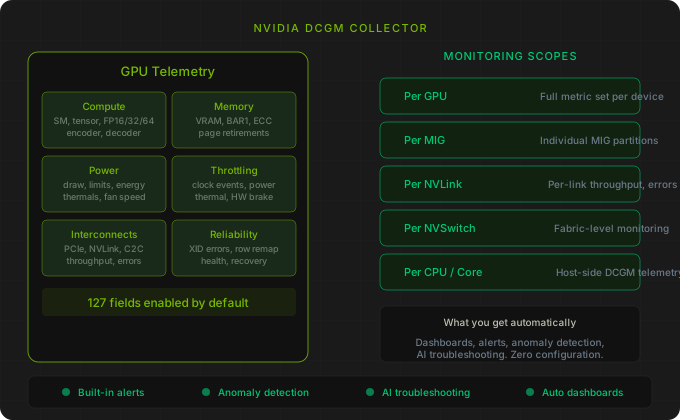
We’ve built a native DCGM collector for Netdata that aims to be the most comprehensive real-time DCGM monitoring available. It collects hundreds of metrics from dcgm-exporter, organizes them into meaningful scopes (per GPU, per MIG instance, per NVLink, per NVSwitch, per CPU), and gives you everything Netdata provides for any other collector: automated dashboards, built-in alerts, anomaly detection, and AI-powered troubleshooting. Out of the box.
What gets collected
The collector scrapes the dcgm-exporter Prometheus endpoint and maps every numeric field into Netdata-native contexts. Rather than dumping raw metrics into a flat list, the collector organizes them into categories that match how you actually think about GPU health and performance.
Compute activity covers SM utilization, SM occupancy, DRAM activity, FP16/FP32/FP64 utilization, tensor core activity (DFMA, HMMA, IMMA), graphics engine activity, and encoder/decoder utilization. This is where you look when you want to know whether your GPUs are actually being used effectively or sitting idle while your training job bottlenecks on data loading.
Memory includes VRAM usage (used, free, reserved), BAR1 memory usage, memory utilization percentage, ECC error rates and counts across all memory subsystems (L1, L2, shared memory, register file, texture cache, device memory), and page retirement tracking. ECC errors in particular are something you want to catch early, because they often precede hardware failure.
Power and thermals track current power draw against management limits (default, min, max, enforced), energy consumption, GPU and memory temperatures against shutdown and slowdown thresholds, and fan speed. The power smoothing fields for newer GPUs are also covered.
Throttling is monitored through both clock event reasons (a bitmask showing the current throttle cause) and violation counters that measure cumulative time spent throttling due to power limits, thermal limits, hardware brakes, reliability constraints, and software power caps. If your training jobs are slower than expected, this is often why.
Interconnects cover PCIe throughput (RX/TX), NVLink throughput per link and aggregate, NVLink error rates (CRC, replay, recovery), PCIe correctable errors and replays, and link generation and width for both PCIe and ConnectX. For multi-GPU systems, interconnect health directly affects collective operations performance.
Reliability tracks XID errors (the GPU equivalent of kernel panics), row remapping status and events, memory health indicators, and recovery actions. The built-in alerts fire on XID errors, row remap failures, uncorrectable remapped rows, and throttling violations.
Six monitoring scopes
The collector doesn’t treat all metrics as flat per-GPU data. It recognizes six distinct scopes:
Per GPU is the primary scope with the full set of metrics for each physical GPU device.
Per MIG instance provides the same depth of monitoring for Multi-Instance GPU partitions, so you can track compute, memory, power, and interconnect metrics for individual MIG slices independently.
Per NVLink gives you per-link throughput, error rates, bit error ratios, congestion, and link state for each NVLink connection. Essential for diagnosing collective communication bottlenecks in multi-GPU training.
Per NVSwitch covers switch-level throughput, latency histograms, error counts, power, voltage, and temperature for NVSwitch-based fabrics (DGX, HGX systems).
Per CPU and per CPU core provide host-side CPU telemetry from DCGM, including utilization, frequency, power, and temperature at both socket and core granularity.
127 fields out of the box, customizable beyond that
The collector ships with a Netdata-recommended dcgm-exporter field profile that enables 127 fields by default. This profile is designed to give comprehensive coverage without overwhelming the exporter. Every remaining known DCGM field is documented as a commented entry in the profile file, so enabling additional fields is a single uncomment away.
The profile is available as a ready-to-use CSV file: dcgm-exporter-netdata.csv. Point your dcgm-exporter at it and the collector handles the rest.
Built-in alerts
The collector includes alerts for the GPU conditions that matter most in production:
XID errors fire when the NVIDIA driver reports a GPU error. XID errors range from recoverable (application-level) to fatal (requires GPU reset or node reboot), and catching them quickly is critical for maintaining job availability.
Row remap failures indicate that the GPU’s memory error correction has exhausted its ability to remap faulty rows. This is a hardware degradation signal.
Uncorrectable remapped rows fire when new uncorrectable memory errors trigger row remapping, which is an early indicator of declining GPU health.
Power and thermal throttling alerts notify you when GPUs are being throttled, which directly impacts workload performance.
Anomaly detection and AI troubleshooting
Because the DCGM collector is a standard Netdata collector, every metric it collects automatically gets Netdata’s anomaly detection applied. Unusual patterns in GPU utilization, memory usage, error rates, or power consumption are flagged without any configuration. When something does go wrong, Netdata AI can troubleshoot DCGM alerts the same way it handles any other alert: analyzing the context, correlating with other metrics, and suggesting likely causes.
Getting started
You need dcgm-exporter running and exposing a Prometheus endpoint (default port 9400). Configure the exporter to use the Netdata field profile, and keep the Netdata collection interval aligned with the exporter’s collection interval (both default to 30 seconds).
Configuration can be done through the Netdata Dynamic Configuration UI (search for dcgm under Collectors) or by editing go.d/dcgm.conf directly.
For detailed setup instructions, authentication options, TLS configuration, and cardinality tuning, see the DCGM collector documentation.
This collector is available now for all Netdata users.