














If you’re running Netdata collectors that connect to databases, APIs, or other authenticated services, there’s a good chance you have passwords sitting in plain-text configuration files right now. It works, but it’s the kind of thing that makes security teams nervous and makes credential rotation painful. Every password change means editing config files and restarting collectors.
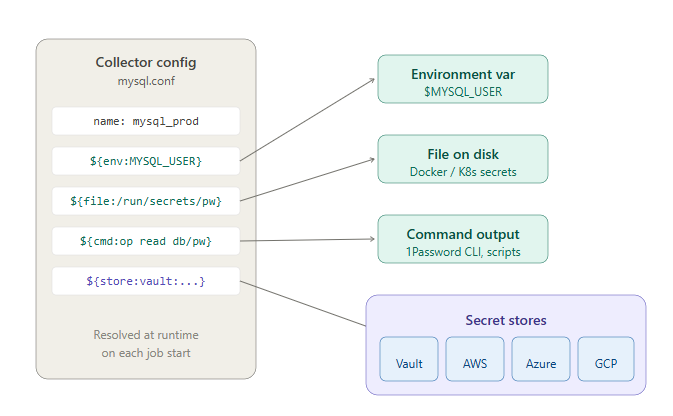
Netdata now supports secrets management natively. Instead of putting credentials directly in your collector configurations, you reference them using a resolver syntax, and Netdata resolves the actual values at runtime from whatever source you choose: environment variables, files on disk, the output of a command, or a centralized secret store like HashiCorp Vault or AWS Secrets Manager.
Four resolver types
The resolver syntax is straightforward. You replace the literal credential in your config with a reference, and Netdata handles the rest.
Environment variables use ${env:VAR_NAME}. If your deployment already injects secrets into the Netdata service environment (common in containerized setups), this is the simplest path.
File references use ${file:/absolute/path}. This works well with Docker Secrets and Kubernetes Secrets mounted as volumes, where the secret value lives in a file on disk.
Command references use ${cmd:/absolute/path args}. Netdata executes the command and uses its output as the secret value. This is how you’d integrate with the 1Password CLI, aws secretsmanager get-secret-value, or any custom script your team maintains.
Secretstore references use ${store:<kind>:<name>:<operand>}. This is the integration path for centralized secret management platforms.
Secretstore backends
For teams managing secrets centrally, Netdata integrates with four backends out of the box:
AWS Secrets Manager (aws-sm) supports environment credentials, ECS task roles, and EC2 instance profiles. The operand format is secret-name or secret-name#key for JSON secrets.
Azure Key Vault (azure-kv) supports service principals, managed identity, and the default credential chain. The operand format is vault-name/secret-name.
Google Secret Manager (gcp-sm) authenticates via the metadata server or a service account file. The operand format is project/secret with an optional /version suffix.
HashiCorp Vault (vault) supports token and token-file authentication. The operand format is path#key.
You can configure secretstore backends through the Netdata Dynamic Configuration UI (under Collectors → go.d → SecretStores) or via configuration files under /etc/netdata/go.d/ss/.
What this looks like in practice
Here’s a MySQL collector referencing its password from HashiCorp Vault:
# /etc/netdata/go.d/mysql.conf
jobs:
  - name: mysql_prod
    dsn: "netdata:${store:vault:vault_prod:secret/data/netdata/mysql#password}@tcp(127.0.0.1:3306)/"
You can mix resolver types in the same config value. For example, reading the username from an environment variable and the password from Vault:
jobs:
  - name: mysql_prod
    dsn: "${env:MYSQL_USER}:${store:vault:vault_prod:secret/data/netdata/mysql#password}@tcp(127.0.0.1:3306)/"
How resolution works
Secrets are resolved each time a collector job starts or restarts. There’s no caching of secret values across restarts, so credential rotation is picked up naturally.
When you update a secretstore configuration, Netdata automatically restarts any collector jobs that depend on it, so they pick up the new credentials without manual intervention.
One detail worth noting: the secretstore configuration values themselves also support ${env:...}, ${file:...}, and ${cmd:...} resolvers. This means your Vault token or AWS credentials don’t need to be in plain text either. It’s resolvers all the way down.
Getting started
If you’re currently storing credentials in plain text in your collector configs, the migration path is incremental. You can convert one collector at a time. Start with whichever resolver type matches your existing secrets infrastructure: if you’re already using Docker Secrets, use the file resolver. If you’re running Vault, use the secretstore resolver. Nothing changes about how the collectors themselves work.
For detailed setup instructions, backend-specific authentication guides, and troubleshooting, see the Secrets Management documentation.
This feature is available now for all Netdata users.