How Netdata is deployed
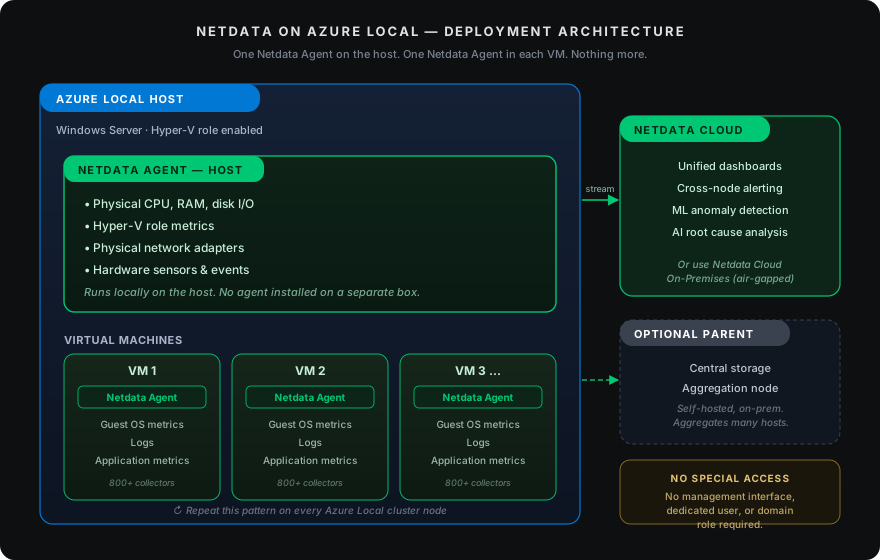
Two agents per node: host and guest, no special access required
A Netdata Agent is installed on every Azure Local host (Windows Server with Hyper-V role) to collect physical CPU, RAM, and disk I/O, Hyper-V role metrics, physical network adapters, and hardware sensors and events. A second Netdata Agent is installed inside each Azure Local VM to collect guest OS metrics, logs, and application-level metrics through Netdata’s 800+ collectors. The result is complete visibility from the hardware up through every guest workload.
No special access needed. You don’t need to open up any management interface, create dedicated users, or grant domain roles to monitor any of this. The agents run locally on each system and report through Netdata Cloud (or to an optional Parent for centralized storage and aggregation).
Host metrics + VM metrics + apps — from one platform
Try Netdata on Azure Local














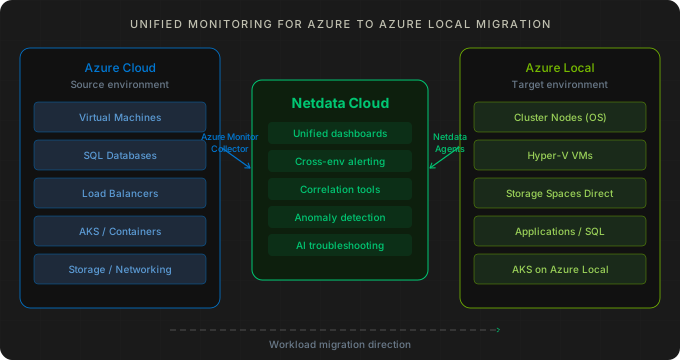
 Azure to Azure Local Migration